
Do you want to enjoy wireless music and hands-free calls in your car without buying a whole new stereo system? Making your car stereo Bluetooth-ready is easier than you think.
Imagine connecting your phone instantly and controlling your music with just a tap—no messy wires, no hassle. You’ll discover simple, step-by-step ways to upgrade your car stereo for Bluetooth. Keep reading, and you’ll be cruising with modern convenience in no time.
Benefits Of Bluetooth In Car Stereo
Bluetooth technology has changed how we use car stereos. It makes driving safer and more fun. Installing Bluetooth in your car stereo adds many useful features. These benefits improve your driving experience every day.
Improved Audio Quality
Bluetooth lets you play music without wires. The sound is clear and steady. No more static or tangled cords. It sends audio directly from your phone to the stereo. This means better sound for your favorite songs.
Hands-free Calling
Bluetooth allows you to make calls without holding your phone. You can keep both hands on the wheel. This makes driving safer and easier. The car stereo uses a built-in microphone for clear voice calls. You can talk and listen without distractions.
Wireless Music Streaming
With Bluetooth, you can stream music from any device. No need to plug in cables or change settings. Just connect your phone and start playing playlists, podcasts, or radio. It gives you more freedom to enjoy your music on the road.

Credit: www.youtube.com
Check Your Current Stereo Compatibility
Before adding Bluetooth to your car stereo, check if it can support it. Not all stereos have Bluetooth built in or the ability to add it. Knowing your stereo’s compatibility saves time and money. It helps you decide if you need an adapter or a new stereo system.
Identify Stereo Model
Start by finding your stereo’s model number. Check the front panel or inside the unit. You can also look in your car’s manual. Write down the model and brand. This information helps to find its features online.
Look For Bluetooth Features
Check if your stereo already has Bluetooth. Look for a Bluetooth logo or a phone symbol on the unit. Some stereos have Bluetooth but need activation. Read your stereo manual or search online for Bluetooth support details.
Assess Upgrade Options
If your stereo lacks Bluetooth, think about upgrades. Some models allow adding Bluetooth adapters. These plug into the auxiliary or USB port. Otherwise, consider replacing the stereo with a Bluetooth-ready unit. Choose the best option for your budget and needs.
Bluetooth Adapter Types
Bluetooth adapters let you add wireless audio to your car stereo. They come in different types. Each type works in its own way. Knowing these types helps you choose the best one for your car.
Plug-and-play Adapters
Plug-and-play adapters connect directly to your car’s AUX port. You just plug them in and pair your phone. They deliver clear sound without wires. These adapters are easy to use and require no installation.
Fm Transmitters
FM transmitters send audio through a radio frequency. You tune your car radio to the transmitter’s frequency. They work even if your car has no AUX input. Sound quality depends on signal strength and interference.
Wired Bluetooth Kits
Wired Bluetooth kits connect to your car stereo’s wiring. They often need professional installation. These kits provide stable sound and control from your car’s dashboard. They suit older cars without modern audio features.
Installing A Bluetooth Adapter
Installing a Bluetooth adapter in your car stereo is a simple way to add wireless audio. It allows you to play music and take calls without using cables. This process works for most car stereos without built-in Bluetooth.
The installation takes less than an hour. Basic tools and a few steps are needed. Follow this guide to install your adapter quickly and safely.
Required Tools
- Bluetooth adapter kit
- Screwdriver set
- Wire strippers or cutters
- Electrical tape
- Multimeter (optional for checking connections)
- User manual for your car stereo
Step-by-step Installation
- Turn off your car and disconnect the battery to avoid shocks.
- Remove the stereo unit carefully using screwdrivers.
- Locate the wiring harness behind the stereo.
- Connect the Bluetooth adapter’s power wires to the car’s power supply wires.
- Attach the audio output wires from the adapter to the stereo’s input wires.
- Secure all connections with electrical tape or connectors.
- Reinstall the stereo unit and reconnect the car battery.
- Power on the car and the stereo system.
Testing The Connection
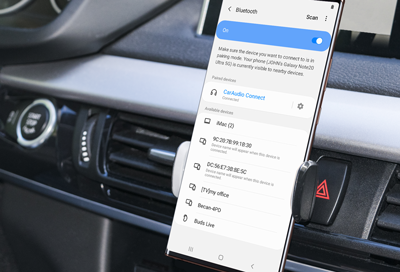
Turn on Bluetooth on your phone or device. Search for the adapter name in the Bluetooth list. Pair your device by entering the code if asked.
Play music or make a call to test audio quality. Check for clear sound without interruptions. Adjust volume and settings on both the phone and stereo.
If the connection fails, check wiring and adapter power. Repeat the pairing process if needed. Once connected, enjoy wireless audio in your car.
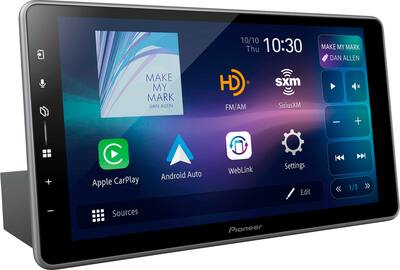
Upgrading To A Bluetooth Head Unit
Upgrading to a Bluetooth head unit is a popular way to modernize your car stereo. It lets you play music wirelessly and use hands-free calls. This upgrade improves sound quality and adds convenience to your drive.
Replacing your old stereo with a Bluetooth head unit is easier than you think. Many models fit standard car dashboards. You gain control over your audio and phone without messy wires.
Choosing The Right Head Unit
Pick a head unit that fits your car’s dashboard size. Check if it supports your phone’s Bluetooth version. Look for features like touchscreens or voice control if you want. Quality sound output matters for a better listening experience. Read reviews to find reliable brands with good support.
Installation Process
Disconnect the car battery before starting to avoid short circuits. Remove the old stereo carefully using proper tools. Connect wiring harnesses from the new head unit to your car’s wiring. Secure the head unit in the dashboard slot. Reconnect the car battery and power on the new stereo. If unsure, consider professional installation to avoid damage.
Configuring Bluetooth Settings
Turn on Bluetooth on your new head unit and your phone. Search for the head unit on your phone’s Bluetooth list. Pair the devices by confirming the code on both screens. Set the head unit as the audio device for calls and music. Adjust volume and audio settings for clear sound. Test the connection by playing music and making a call.
Troubleshooting Common Issues
Adding Bluetooth to your car stereo can be very useful. Sometimes, issues come up that stop Bluetooth from working well. Knowing how to fix common problems saves time and frustration. Here are some simple tips for troubleshooting Bluetooth issues in your car stereo.
Pairing Problems
Pairing means connecting your phone to the car stereo. If pairing fails, first check if Bluetooth is on both devices. Make sure your phone and stereo are close to each other. Restart both devices to refresh their settings. Clear old Bluetooth connections on your phone to avoid confusion. Sometimes, deleting the device from the car’s Bluetooth list helps. Follow the car stereo’s manual for correct pairing steps. Use the right PIN or code if asked during pairing.
Audio Quality Issues
Audio problems can ruin your music experience. Check the volume levels on both the phone and stereo. Low volume or muffled sound may come from weak Bluetooth signals. Move devices closer to improve sound. Interference from other electronics may cause noise or crackling. Turn off other Bluetooth devices nearby. Try playing music from a different app or phone. Update your phone’s and stereo’s software for better compatibility.
Connection Drops
Connection drops mean the Bluetooth link breaks unexpectedly. This can happen if devices move too far apart. Keep your phone near the stereo while driving. Check if your phone’s battery saver mode turns off Bluetooth. Disable power-saving features that may stop Bluetooth. Restart the stereo and phone to reset the connection. Remove other paired devices that may interfere. Consistent updates of your devices reduce connection problems.
Maintaining Your Bluetooth System
Keeping your car stereo Bluetooth system in good shape helps it work well for a long time. Small efforts can stop problems before they start. Regular care makes your music and calls clear and smooth. Follow these simple tips to keep your Bluetooth system ready for every drive.
Regular Updates
Check your Bluetooth device for software updates often. Updates fix bugs and improve connection quality. Use the device’s app or website to find updates. Install them as soon as possible. Updated software helps avoid pairing problems and drops in sound.
Cleaning And Care
Keep your car stereo and Bluetooth receiver clean. Dust and dirt can block buttons and ports. Use a soft cloth to wipe the surfaces gently. Avoid liquid cleaners that can damage electronics. Proper cleaning helps your system last longer and work better.
Battery Management
Charge your Bluetooth receiver regularly if it has a battery. Avoid letting the battery drain completely. Store the device in a cool, dry place when not in use. Good battery care prevents sudden power loss during trips. It ensures your Bluetooth stays ready whenever you need it.
Credit: www.bestbuy.com
Credit: www.samsung.com
Frequently Asked Questions
How Do I Add Bluetooth To My Car Stereo?
You can add Bluetooth using a Bluetooth adapter or a new stereo with Bluetooth. Adapters plug into the aux or USB port. New stereos offer built-in Bluetooth features for seamless connectivity and better sound quality.
Can I Convert My Existing Car Stereo To Bluetooth?
Yes, you can convert it with Bluetooth adapters. These devices connect via aux input or cassette adapter. They allow wireless music streaming and hands-free calling without replacing your stereo.
What Is The Easiest Way To Get Bluetooth In My Car?
The easiest way is to buy a plug-and-play Bluetooth adapter. It connects directly to your car’s aux port or cigarette lighter. It requires minimal setup and no technical skills.
Are Bluetooth Car Stereo Kits Compatible With All Vehicles?
Most Bluetooth kits work with standard aux or USB ports. However, compatibility depends on your car model and stereo type. Check the adapter’s specifications before purchasing to ensure proper fit and function.
Conclusion
Adding Bluetooth to your car stereo is easier than it seems. You can enjoy wireless music and hands-free calls quickly. Choose the right Bluetooth adapter or replace your stereo for best results. Follow simple steps for installation and pairing. This small upgrade brings big convenience on the road.
Drive safer and listen to your favorite songs without wires. Try it today and feel the difference in your daily commute.